 Back
Back Print
Print Feedback
You may also be interested in...
Configuring a Salesforce.com Integration
How the Salesforce.com Link Works
Troubleshooting Salesforce.com Integrations
Salesforce.com Communication Templates
Single Signon - Viewing Reports within Salesforce.com

Go To:
1. Screenshot
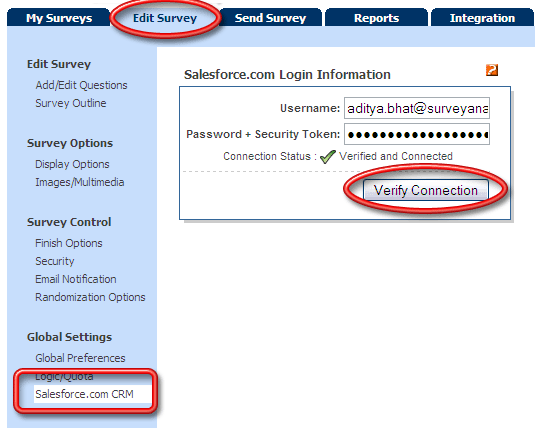
The username will be the same as your Salesforce.com username.
Enter the password and security token in the password field. For example, if your password is "myPassword" and your security token is "XXXXXXX", you will enter "myPasswordXXXXXXX" into the password field.
Click on the Verify Connection button.
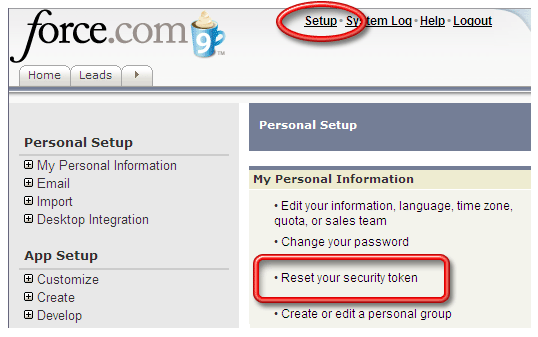
Log in your Salesforce account. Click on the Setup link and then click on Reset your security token link.
2. Screenshot
Configuring a Salesforce.com Integration
How the Salesforce.com Link Works
Troubleshooting Salesforce.com Integrations
Salesforce.com Communication Templates
Single Signon - Viewing Reports within Salesforce.com